Totonoe Skin Retouch: skin retouch plugin for Premiere Pro and After Effects
Apply it, and skin
evens out naturally
It detects skin color automatically and evens out roughness, redness and shine while keeping edges and texture (pores and fine skin detail). Just apply the effect and the default setting (Standard) is already working.
Not a subscription: you pay once (US$65) and keep using it. Checkout is on Gumroad, and no Gumroad account is needed. The free trial has every feature of the full version and adds faint diagonal stripes (a watermark) to the video.
Using DaVinci Resolve? This product is for Premiere Pro and After Effects. The DaVinci Resolve version is a separate product. It is Mac only, and Windows is not supported. About the DaVinci Resolve version
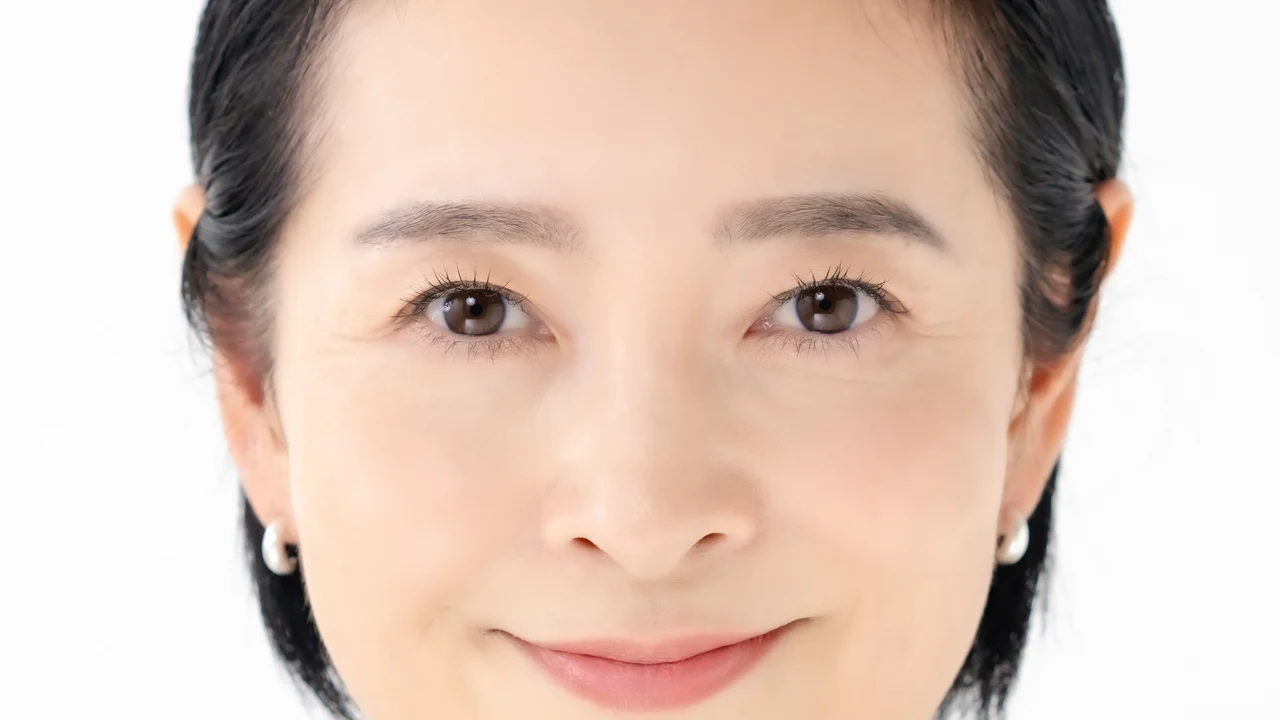
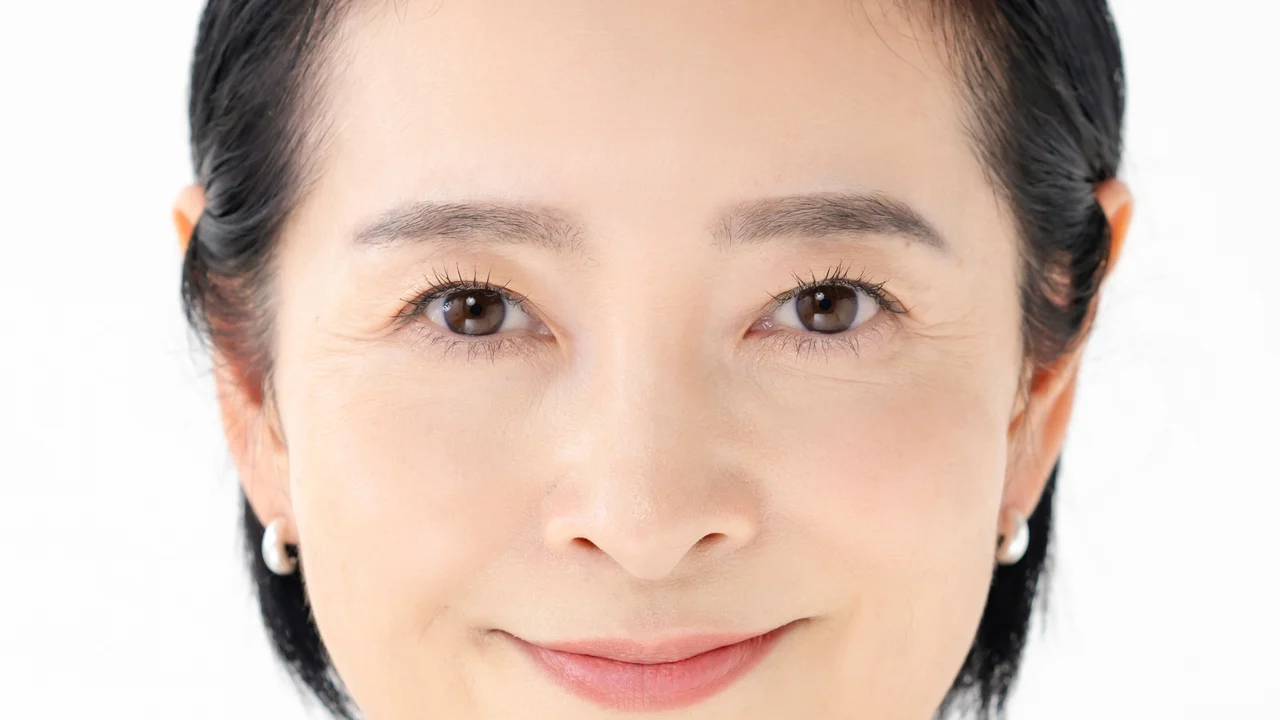 BEFORE
AFTER
Drag left or right to compare Before and After of the same photo. With a keyboard, use the arrow keys.
ABOUT
What is Totonoe Skin Retouch?
Totonoe Skin Retouch is a skin retouch plugin for Premiere Pro and After Effects. It detects skin color in the video automatically and evens out roughness, redness, shine and uneven color while keeping edges and texture. You only apply the effect, so you do not have to reselect the skin area for each cut.
| Type | Skin retouch (beauty) effect plugin |
|---|---|
| Host apps | Adobe Premiere Pro, After Effects (2025 or later). The DaVinci Resolve version is a separate product (Mac only, Windows is not supported; details) |
| OS | macOS 13 or later, Windows 10 / 11 (64-bit) |
| What it adjusts | Skin roughness, redness, shine, small blemishes and acne, uneven color, skin tone |
| Price | One-time purchase (not a subscription). Free trial available |
| Sold on | Gumroad (full version, priced in US dollars, no Gumroad account needed). The free trial is on BOOTH (totonoe-plugin) |
Skin retouch plugins for Premiere Pro and After Effects compared
| Product | License | Price | Adobe hosts |
|---|---|---|---|
| Totonoe Skin Retouch | One-time purchase | US$65 | Premiere Pro, After Effects |
| Beauty Box Video (Digital Anarchy) | See vendor site | $199 (one host app) | Premiere Pro, After Effects |
| Portraiture Video (Imagenomic) | One-time purchase | $249.95 (Premiere Pro / After Effects version) | Premiere Pro, After Effects |
| Retouch4me Dodge & Burn (Retouch4me) | One-time purchase | See vendor site | Premiere Pro |
| Skinworks foundation (digital bigmo) | Annual subscription | See vendor site | Premiere Pro, After Effects |
| Magic Bullet Cosmo II (Maxon Red Giant) | Not sold separately. Included in a Red Giant subscription | See vendor site | Premiere Pro, After Effects |
| Continuum Beauty Studio (Boris FX) | Not sold separately. Included in Continuum | See vendor site | Premiere Pro, After Effects |
Prices checked on Nov 7, 2026 from official sites. We have not tested competitor products. "See vendor site" means we could not confirm a current price on the vendor's official page, so check the vendor for the latest price and license terms. The author of this page develops Totonoe Skin Retouch.
DEMO
Before and after on three faces (39 seconds)
Close-ups with the Standard preset at default settings, shown side by side and at 2x zoom. The video loads from YouTube only when you press play.
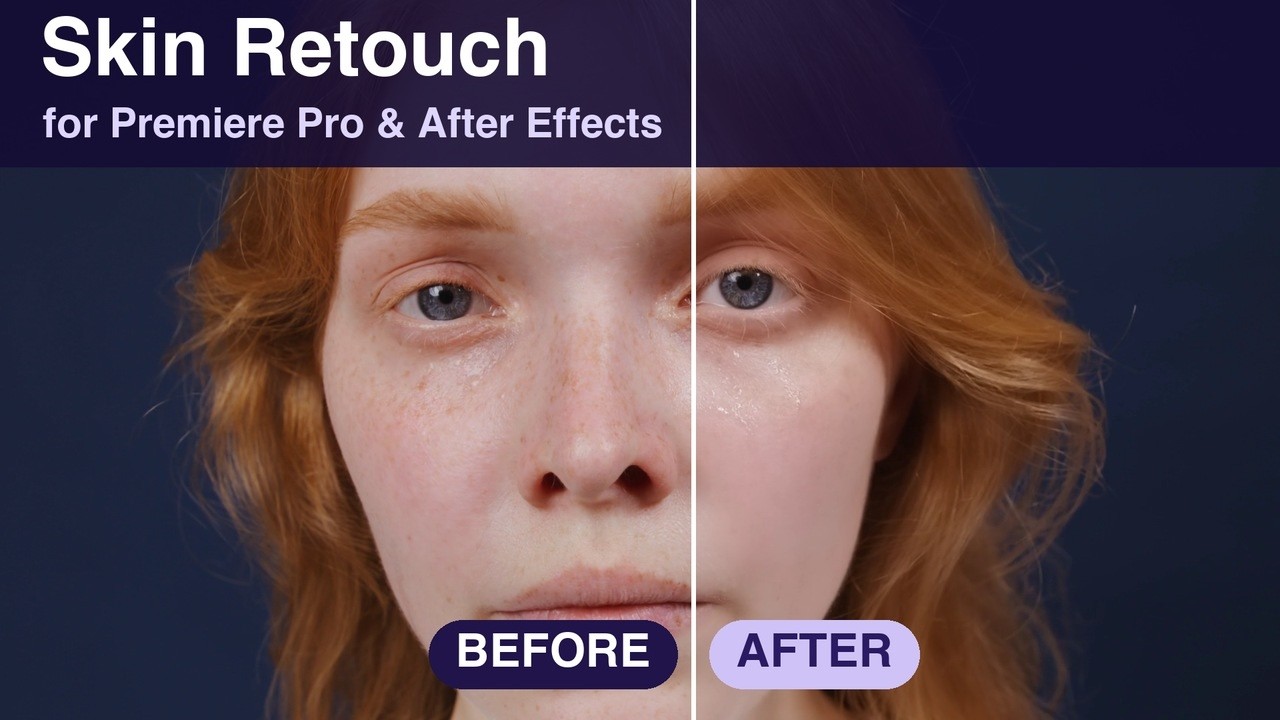 Totonoe Skin Retouch before and afterYouTube / 39 seconds
An earlier 44-second demo is on Vimeo.
FIRST IMPRESSION
Even skin tone with the default setting
Auto Detect and the Standard preset are on from the start. As soon as you apply the effect to a clip, only the skin is processed. You only need to touch the parameters when you want to adjust the look.
- Detects skin color automatically and processes only the detected area
- Edge-preserving smoothing with texture restoration avoids a painted-over look
- Developed by an editor who uses it on music videos, interviews and commercials
HOW TO USE
Three steps
The steps are the same in Premiere Pro and After Effects.
-
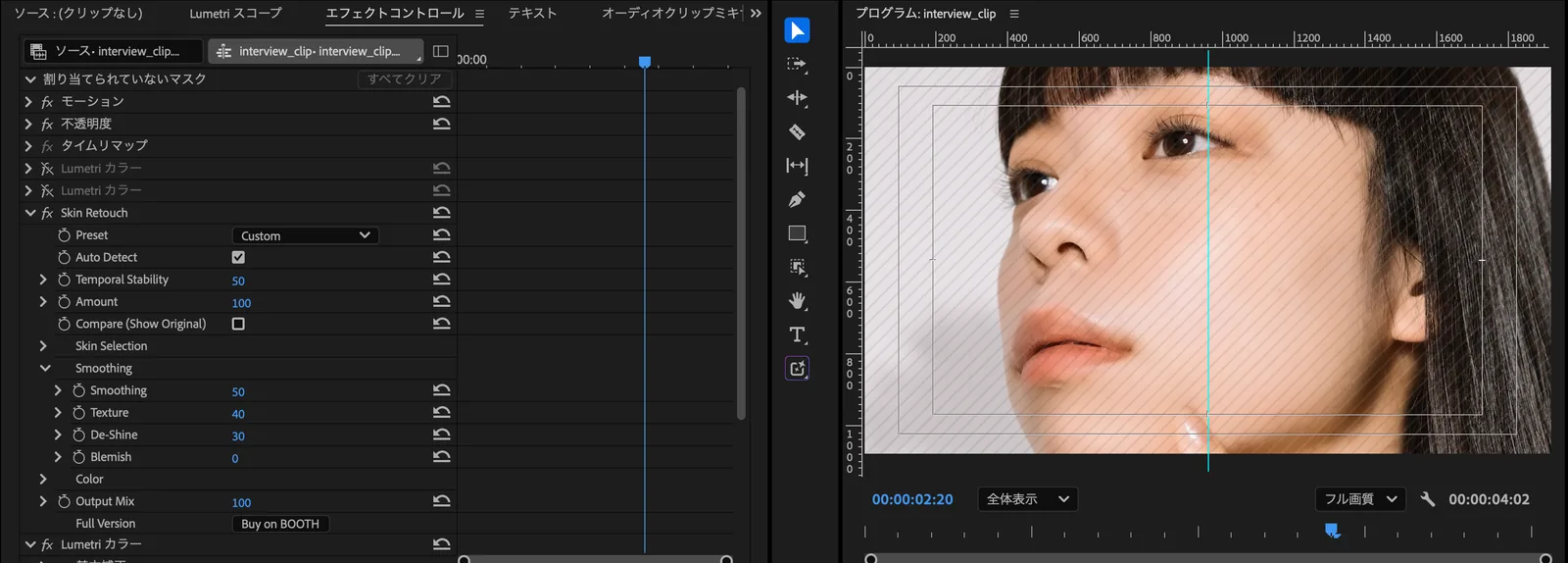
Apply the effect
Apply the "Skin Retouch" effect to a clip.
-
Choose a preset
Pick one of three: Natural, Standard or Strong. If you are not sure, start with Standard.
-
Adjust the strength with Amount
Use the Amount slider to set the overall strength.
FEATURES
Features
Processes only the skin
It detects skin color automatically and applies the effect only to the detected area. You can check the area with Show Mask. Edge-preserving smoothing keeps the outline of the face, eyebrows and eyelashes from blurring.
Works in both Premiere Pro and After Effects
One plugin works in either host. It supports Premiere Pro and After Effects 2025 or later.
One-time purchase
There are no monthly or yearly fees. Bug fixes and compatibility updates within the same major version come at no extra cost.
QUALITY
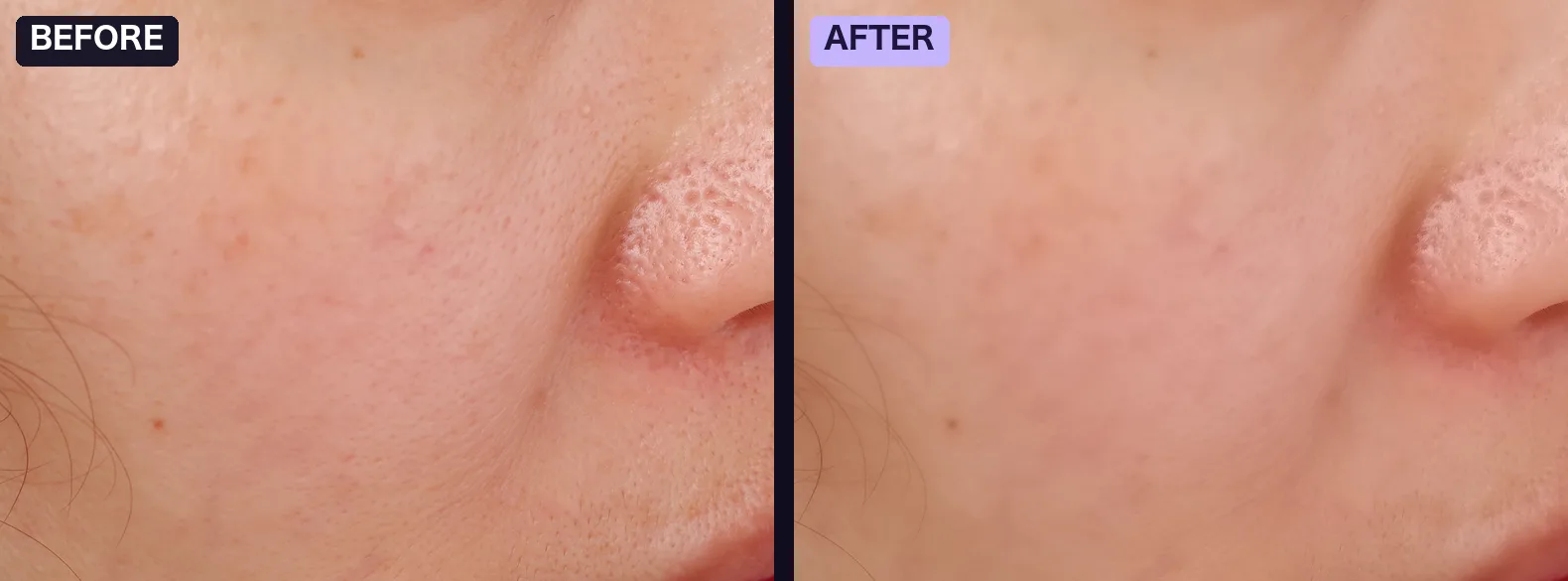
Details
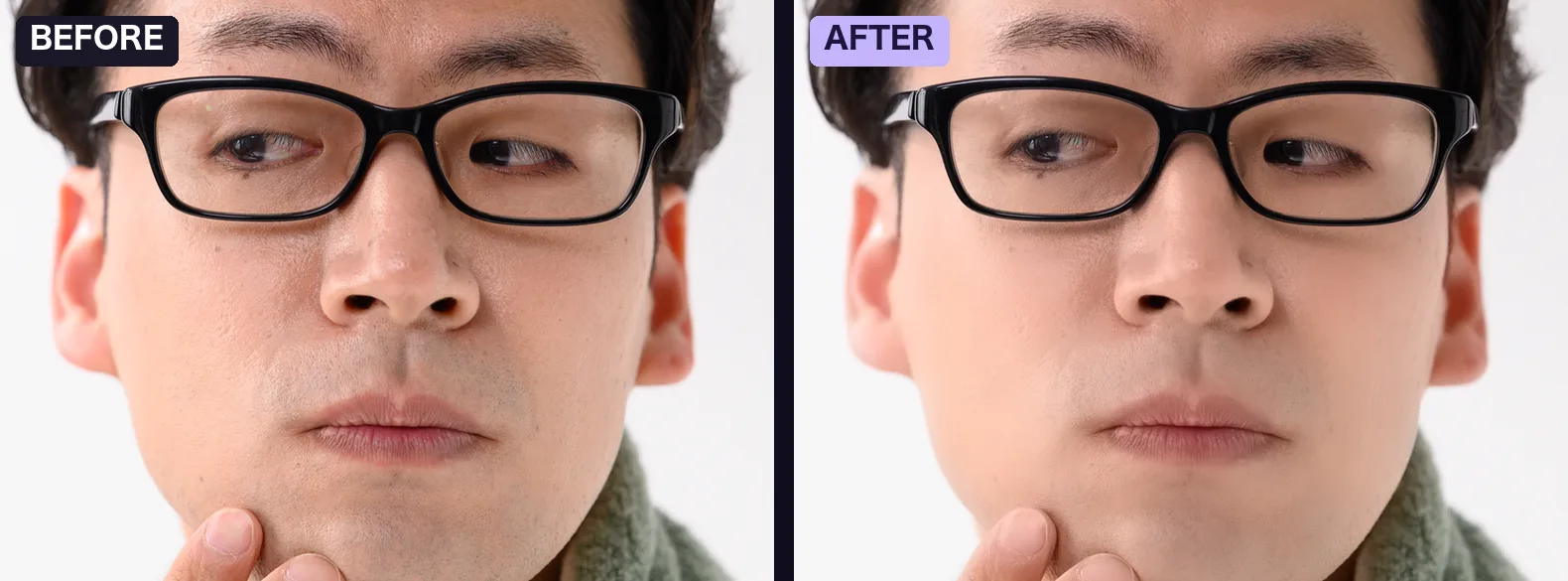
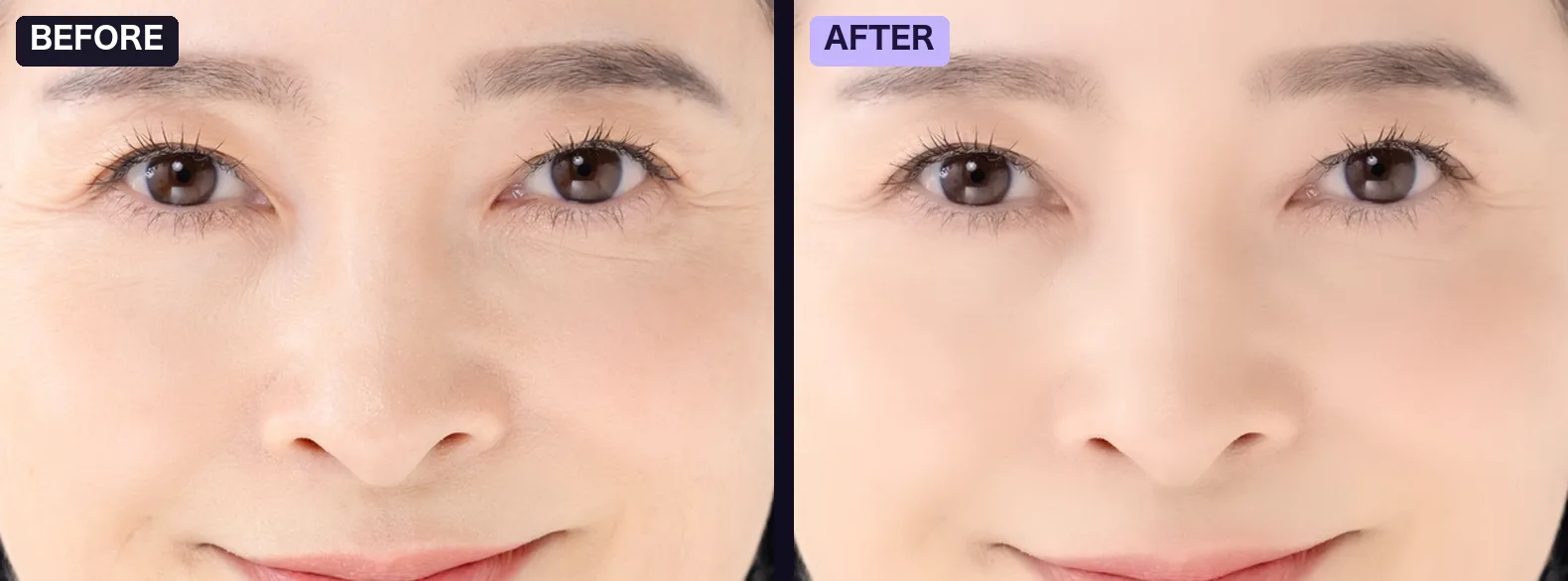
These images show before and after side by side, using the plugin's output as it is. Each photo was reduced to 1920 px wide, processed with the default setting (Standard), and cropped to part of the face. Click or tap an image to open it at full size.
PRESETS
Choose a preset, then fine-tune with Amount
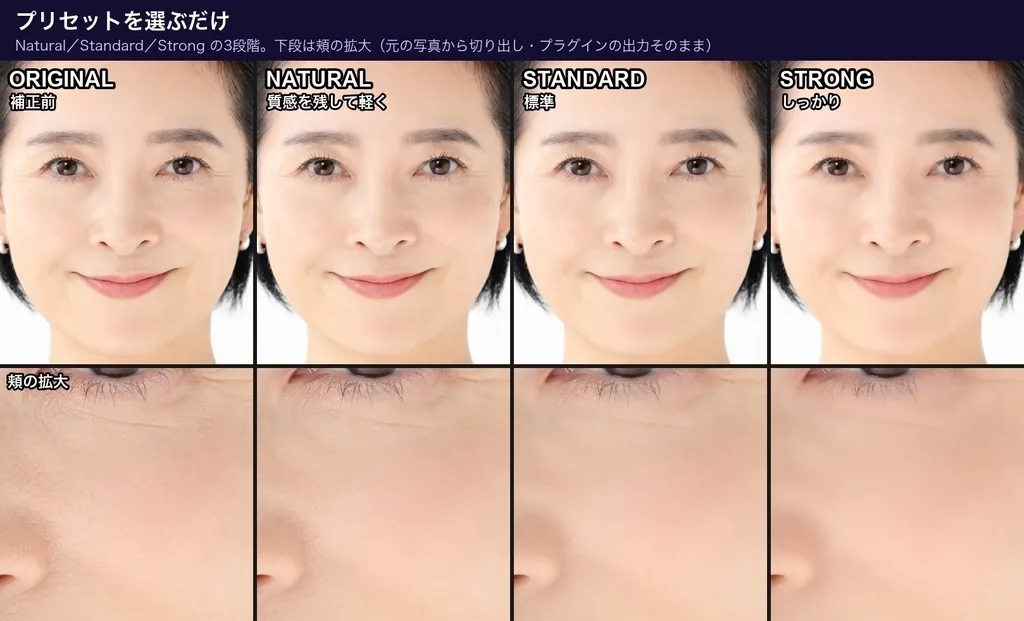
There are three presets. The comparison on the right shows how they differ.
- Natural: a light touch that keeps texture
- Standard: the default
- Strong: a firmer retouch
With any preset, Amount changes the overall strength. Compare lets you check your work against the original.
PARAMETERS
Main parameters
You can start with just Preset and Amount. Use the parameters below when you want finer control.
- Preset
- Choose Natural, Standard or Strong.
- Amount
- Adjusts the overall strength of the effect.
- Compare
- When on, shows the video before processing. Switch it on and off to compare.
- Output Mix
- Sets how much of the processed video is mixed with the original.
- Temporal Stability
- Reduces flicker caused by the detected skin area changing from frame to frame.
- Auto Detect
- Detects skin color automatically. It is on by default.
- Smoothing
- Evens out skin roughness while keeping edges.
- Texture
- Sets how much of the pores and fine skin detail lost in smoothing is restored.
- De-Shine
- Reduces shine on the skin.
- Blemish
- Makes small blemishes and acne less noticeable.
- Redness / Paleness
- Redness raises or lowers skin redness. Paleness moves skin toward lighter or more tanned.
- Show Mask
- Shows the area detected as skin. Use it when adjusting Hue Range and similar settings.
Good to know before you use it
- Large moles over 7 px in diameter are not removed. This is by design, to protect eyebrows and eyelashes.
- Convert log footage to Rec.709 before applying the effect.
- Skin detection is based on skin color, so a background with a skin-like color may also be detected. If that happens, narrow Hue Range.
SYSTEM REQUIREMENTS
System requirements
Mac
- OS
- macOS 13 or later
- CPU
- Apple Silicon / Intel (Universal Binary)
- GPU
- Processed on a Metal-compatible GPU
Windows
- OS
- Windows 10 / 11 (64-bit)
- Processing
- CPU only. It does not use the GPU, so it is slower than the Mac version.
A free Windows beta is available until November 15, 2026. Get it from the beta page on BOOTH. The official Windows version will be released on November 16, 2026.
The official Windows version is available. It is included in the full version product, so one purchase covers both Mac and Windows. If you already bought the Mac version on BOOTH, you can download the Windows version from your BOOTH library at no extra cost. The Gumroad product includes both the Mac and Windows installers.
Host apps: Premiere Pro / After Effects 2025 or later. The DaVinci Resolve version is a separate product (Mac only, Windows is not supported).
Bit depth: After Effects supports 8-bit, 16-bit and 32-bit float. Premiere Pro supports 8-bit and 32-bit float.
DAVINCI RESOLVE
The DaVinci Resolve version is a separate product (Mac only)
Totonoe Skin Retouch comes as separate products for each editing app. To avoid buying the wrong one, here is each combination.
Premiere Pro / After Effects (this page)
- Host apps
- Premiere Pro, After Effects (2025 or later)
- OS
- Mac (Windows version from November 16, 2026)
- Price
- US$65, one-time purchase
DaVinci Resolve (separate product)
- Host app
- DaVinci Resolve (OpenFX). Checked on the free version, 20.3.2
- OS
- Mac only. Windows is not supported
- Price
- US$65, one-time purchase. The license is sold separately from the Premiere Pro / After Effects version
- The DaVinci Resolve version does not run in Premiere Pro or After Effects. The product on this page does not run in DaVinci Resolve
- I checked it on the free version of DaVinci Resolve 20.3.2, on a Mac with Apple Silicon. I have not checked DaVinci Resolve Studio, DaVinci Resolve 21, or an Intel Mac
- The features and parameters are the same as the Premiere Pro / After Effects version. The one difference: there is no eyedropper in the viewer yet, so set the skin color with the Skin Color control
- In color-managed HDR (wide gamut) projects, skin detection can get weaker
A Premiere Pro / After Effects license key does not activate the DaVinci Resolve version. Try the free trial first to check that it works on your Mac and your DaVinci Resolve.
FIXES
Fixed from customer reports
- A customer reported that the Program Monitor went black during playback in Premiere Pro on macOS 27. This was fixed in v1.8.0, and playback was made faster in v1.8.1.
- A customer reported that lips looked paler. v1.9.0 added "Protect Lips & Vivid Colors", and v1.9.1 added "Color Smoothing", which can keep the original colors.
- A Windows beta tester reported a GPU warning in After Effects. It was fixed the same day.
Found a problem or have a request? Contact me in English or Japanese.
PRICING
Price
Totonoe Skin Retouch, full version
One-time purchase (not a subscription). Priced in US dollars. Checkout is on Gumroad, and no Gumroad account is needed.
- Bug fixes and compatibility updates within the same major version are free
- One license is for one user, who can install it on their own multiple computers
- Works in both Premiere Pro and After Effects
This is a download product. Please test it with the free trial before you buy. The trial has every feature of the full version and adds faint diagonal stripes to the video.
The DaVinci Resolve version is a separate product (US$65, one-time purchase, Mac only). Its license is sold separately. About the DaVinci Resolve version
GET IT
Where to get it
The full version is sold on Gumroad. The free trial is on BOOTH, a Japanese marketplace that also has an English interface.
Fix flickering skin retouch
Check a changing skin selection in Premiere Pro and compare Temporal Stability.
Totonoe for DaVinci Resolve (Mac only) The separate Resolve version: free version check, comparison with Studio's face tools, parameters and price How to smooth skin in DaVinci Resolve Qualifier, tracked window, Mid-tone Detail and Blur in the free version, plus Studio's face effects How to reduce skin shine in Premiere Pro Lumetri HSL Secondary and a tracked mask for hot spots, and the De-Shine control Fix flat, plastic-looking skin retouch Why smoothing removes texture, how to ease a negative Sharpen, and how Smoothing and Texture workFAQ
Frequently asked questions
Does Premiere Pro have a beauty filter or skin smoothing effect?
No. Premiere Pro has no beauty filter and no effect made for skin smoothing or retouching. With the built-in tools, you select skin using HSL Secondary in Lumetri Color and adjust it. You have to reselect the skin whenever the shot or lighting changes, so a skin retouch plugin can save time on projects with many cuts. A step-by-step guide to the built-in method is in the article How to Retouch Skin in Premiere Pro.
How does Totonoe Skin Retouch differ from Beauty Box?
Both plugins detect skin by color and retouch it. Totonoe Skin Retouch works with Premiere Pro and After Effects (the DaVinci Resolve version is a separate product, Mac only) and is a one-time purchase of US$65. Digital Anarchy's store lists Beauty Box Video 6.0 at $199 for one host app (checked November 8, 2026), and it also has versions for DaVinci Resolve, Final Cut Pro and Avid. A detailed comparison is in the article Beauty Box Alternative for Premiere Pro and After Effects.
How does it differ from Skinworks?
Totonoe Skin Retouch is a one-time purchase of US$65, and one effect adjusts skin smoothness, shine, small blemishes and redness. Skinworks for Adobe is an annual subscription, split into foundation (evens out skin tone), concealer (removes acne and moles) and gloss (emphasizes highlights). It also has versions for DaVinci Resolve and Nuke. See digital bigmo's site for current prices.
Why is it cheaper than other skin retouch plugins?
Because it has fewer features and supports fewer hosts. It is a single skin retouch effect, with no face detection, no AI-based masking, and no tools for brightening teeth or the whites of the eyes. It supports a narrow set of hosts: Premiere Pro and After Effects, plus a separate Mac-only version for DaVinci Resolve. It is developed by one person and sold directly on Gumroad. If you need to retouch each person separately in a shot with several people, or want to use Final Cut Pro or DaVinci Resolve on Windows, another product may suit you better.
How do I choose a skin retouch plugin?
First check that it supports your editing software. Then narrow the list by one-time purchase versus subscription, and by budget. Most products have a trial, so the most reliable last step is to test them on your own footage.
Is it a subscription?
No, it is a one-time purchase. There are no monthly or yearly fees. Bug fixes and compatibility updates within the same major version are free.
Does it work on Windows?
It works on Windows 10 and 11 (64-bit). The official Windows version was added to the full version product on November 16, 2026. One purchase covers both Mac and Windows. If you already bought the Mac version on BOOTH, you can download the Windows version from your BOOTH library at no extra cost. The Gumroad product includes both the Mac and Windows installers.
The Windows version runs on the CPU only, so it is slower than the Mac version. See System requirements for details.
This answer is about the Premiere Pro and After Effects product. The DaVinci Resolve version is a separate product and is Mac only, so it does not work on Windows.
Does it work in DaVinci Resolve?
There is a separate DaVinci Resolve version. It is Mac only, and Windows is not supported. The product on this page (for Premiere Pro and After Effects) does not work in DaVinci Resolve. I checked the Resolve version on the free version of DaVinci Resolve 20.3.2, on a Mac with Apple Silicon. I have not checked DaVinci Resolve Studio or DaVinci Resolve 21. The Resolve version is a one-time purchase of US$65, and its license is sold separately from this product. Try the free trial first to check that it works on your setup.
Does the DaVinci Resolve version work on Windows?
No. The DaVinci Resolve version is Mac only. There is no Windows version.
I own the Premiere Pro / After Effects version. Do I need to buy the DaVinci Resolve version separately?
Yes. The licenses are sold separately, and a Premiere Pro / After Effects key does not activate the DaVinci Resolve version.
Does it work in DaVinci Resolve Studio?
I have not checked it. I only checked the free version of DaVinci Resolve 20.3.2. Please try the free trial.
Can I try it before buying?
Yes. A free trial is available on BOOTH. It has every feature of the full version, and it adds faint diagonal stripes (a watermark) to the video. Please test it on your own footage with the free trial before you buy.
Is there a free skin smoothing plugin for Premiere Pro?
Totonoe Skin Retouch is not free, but its free trial has every feature and adds a faint diagonal watermark, so you can test it on your own footage. The full version is a one-time purchase of US$65. To smooth skin without a plugin, you can use Lumetri Color in Premiere Pro. The steps are in the article How to Retouch Skin in Premiere Pro.
Does it work offline?
Yes. Once installed, it works without an internet connection. All processing happens on your computer, and your footage is never sent to an external server. The plugin does not connect to the internet, and the license is checked locally. A browser opens only when you click the User Guide or Buy on BOOTH button in the effect.
What happens when there are several people in the shot?
The effect is applied to everyone with a similar skin tone. To apply it to only one person, combine it with a mask in Premiere Pro or After Effects.
The background or clothing is being processed too.
Skin is detected by color, so a background or prop with a skin-like color can be picked up. Check the detected area with Show Mask and narrow Hue Range.
Does it work with log footage?
Convert log footage to Rec.709 before applying the effect.
Can I open saved projects after updating?
Yes. Parameter identifiers stay fixed across versions, so saved projects keep each parameter's value.
How do I contact support?
Send a message through BOOTH. You can write in English or Japanese.
Try it on your own footage first
The free trial has every feature of the full version. You can apply the effect, choose a preset and adjust Amount, all before you buy.