Beauty Box Alternative for Premiere Pro and After Effects (2026)
Totonoe Skin Retouch is a lower-priced alternative to Beauty Box Video for Premiere Pro and After Effects. It is a one-time purchase of US$65, and Digital Anarchy's store lists Beauty Box Video 6.0 at $199 for one host app. Both detect skin by color and smooth only the skin area, but they differ in host support and extra tools.
I am a video editor in Japan (music videos, interviews and commercials) and the developer of Totonoe Skin Retouch. I have not tested Beauty Box on the same footage, so the Beauty Box side of this comparison is based on information Digital Anarchy publishes. Prices were checked on November 8, 2026.
Short answer
- If you edit in Premiere Pro or After Effects and want to spend less, Totonoe Skin Retouch costs about one third of the Beauty Box Video price listed on Digital Anarchy's store.
- If you need Final Cut Pro or Avid, or the extra AI tools for eyes, mouth and teeth, Beauty Box Video is the better choice. Digital Anarchy also lists Beauty Box Video for DaVinci Resolve, so check its OS support for your setup. Totonoe Skin Retouch has a separate DaVinci Resolve version, which is Mac only.
- Both offer a trial with a watermark, so you can compare them on your own footage before paying.
Comparison table
| Totonoe Skin Retouch | Beauty Box Video 6.0 | |
|---|---|---|
| Price | US$65, one-time purchase | $199 for one host app. Each additional host app is usually $89 |
| Premiere Pro and After Effects | Both, with one purchase (2025 or later) | Listed together as the Adobe option |
| Other hosts | DaVinci Resolve (OpenFX), as a separate product. Mac only | Final Cut Pro, Avid, DaVinci Resolve (OpenFX) |
| OS | macOS 13 or later; Windows version (CPU) from November 16, 2026 | macOS 10.14 or later; Windows 10 or later |
| GPU | Metal on Mac. Windows uses the CPU only | Apple Metal, Nvidia CUDA, OpenCL |
| Trial | Every feature, faint diagonal-stripe watermark | Fully functional, watermarked |
| Skin detection | By color, automatic on every frame | By skin tone, automatic mask |
| AI features | None | AI shine removal and AI-based masks (6.0); AI detection of eyes, mouth and teeth |
| Processing | On your computer. Footage is never sent to a server and it works offline | Not stated on the pages I checked |
Beauty Box Video data comes from Digital Anarchy's official pages, checked on November 8, 2026. I could not confirm on those pages whether its license is perpetual or a subscription, so check the store before buying. Prices change, so check the vendor for the current price.
A free Windows beta is available until November 15, 2026. Get it from the beta page on BOOTH.
What is the same and what is different
The same
- Both find skin by its color and build a mask, so smoothing is limited to skin.
- Both are effect plugins for Premiere Pro and After Effects, so you apply them from the Effects panel like any other effect.
- Both offer a trial, so you can test them on your own footage.
Different
- Hosts. Totonoe supports Premiere Pro and After Effects in one product, and DaVinci Resolve (Mac only) in a separate product. Beauty Box also supports Final Cut Pro and Avid.
- Extra tools. Beauty Box lists AI-based masks, AI detection of eyes, mouth and teeth, and teeth and eye whitening. Totonoe is a single skin retouch effect with no face detection.
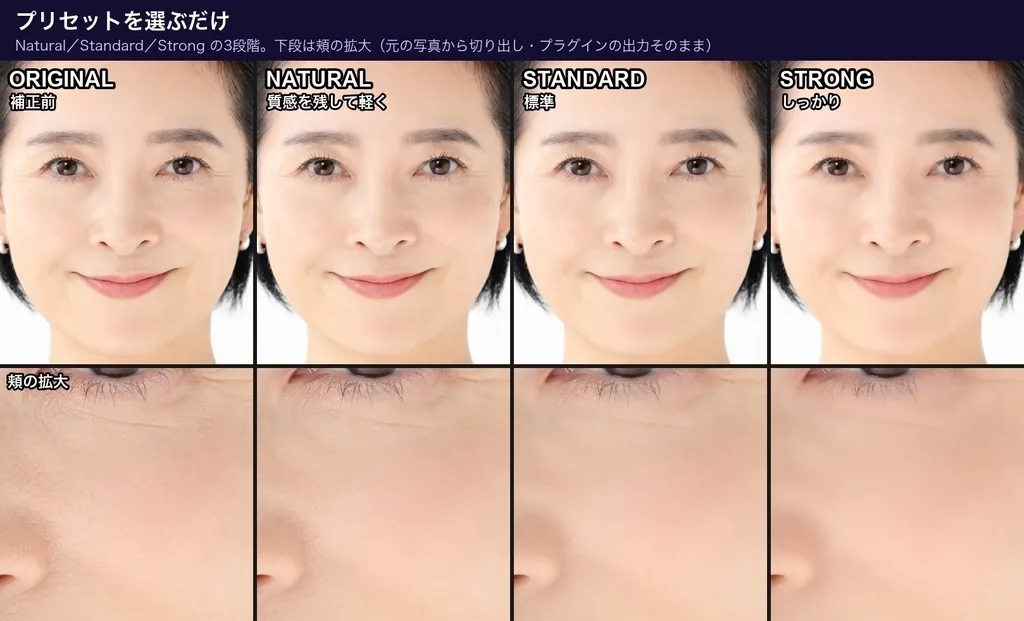
- Setup effort. Totonoe has presets (Natural, Standard, Strong) and one Amount control. Skin is detected the moment you apply the effect, so most shots need no masking.
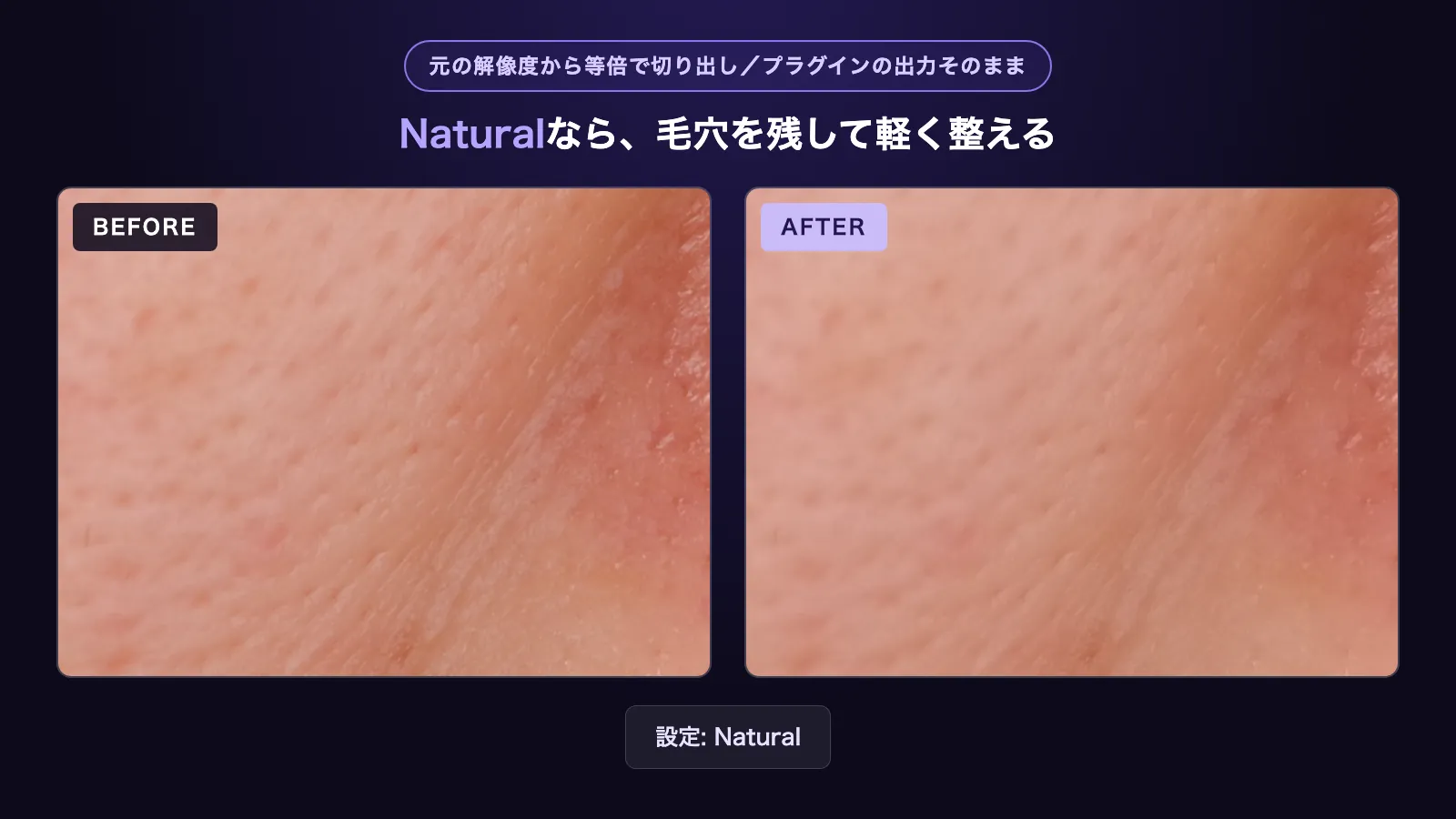
- Texture. Totonoe uses edge-preserving smoothing (a guided filter) to keep eyes, brows, lashes and hair edges sharp, and a Texture control adds back fine pore texture. De-Shine and Blemish controls are separate, and Temporal Stability steadies detection in moving shots.
- Bit depth. Totonoe works in 8, 16 and 32-bit.
When to choose which
Beauty Box Video is the better choice if
- You edit in Final Cut Pro or Avid, or in DaVinci Resolve on Windows.
- You want AI masks for eyes, mouth and teeth, or whitening tools, in the same plugin.
- You want a product from an established vendor with a longer history.
Totonoe Skin Retouch is the better choice if
- You work in Premiere Pro, After Effects, or DaVinci Resolve on a Mac, and want to keep the cost low.
- You want a result in a few clicks, with presets and one Amount control.
- You want footage to stay on your computer, with no network use by the plugin.
Limits of Totonoe Skin Retouch
- It detects skin by color, so everyone with a similar skin tone in the shot is retouched. To treat one person, add a mask in Premiere Pro or After Effects.
- Log footage needs a Rec.709 conversion before the effect.
- It does not run in Final Cut Pro or Avid. The DaVinci Resolve version is a separate product, and it is Mac only.
Try it
The free trial has every feature of the full version. The only difference is a faint diagonal-stripe watermark on the video. The trial is for Mac; the Windows version is included in the full version product from November 16, 2026, at no extra cost for existing buyers.
The product page has the overview and FAQ, and the user guide covers every parameter. If you only want to try the built-in tools first, see How to Retouch Skin in Premiere Pro.
Sources and limits of this comparison
Beauty Box Video information was checked on November 8, 2026 on Digital Anarchy's official pages: the store page, the specs page and the product page. I have not tested Beauty Box on the same footage, so this page does not compare image quality or speed. The author of this page develops Totonoe Skin Retouch.
FAQ
What is a cheaper alternative to Beauty Box Video?
Totonoe Skin Retouch is a one-time purchase of US$65 for Premiere Pro and After Effects. Digital Anarchy's store lists Beauty Box Video 6.0 at $199 for one host app as of November 8, 2026.
Does Totonoe Skin Retouch work in DaVinci Resolve, Final Cut Pro or Avid?
Totonoe Skin Retouch has a separate DaVinci Resolve version. It is Mac only, and Windows is not supported. The Premiere Pro and After Effects version does not run in DaVinci Resolve. Final Cut Pro and Avid are not supported. Digital Anarchy lists Beauty Box Video for DaVinci Resolve, Final Cut Pro and Avid as well.
Can I try Totonoe Skin Retouch before buying?
Yes. The free trial on BOOTH has every feature of the full version and adds a faint diagonal-stripe watermark to the video. Digital Anarchy also offers a fully functional watermarked trial of Beauty Box Video.
Does Totonoe Skin Retouch send my footage to a server?
No. All processing runs on your computer, footage is never uploaded, and the plugin works offline after installation.
Is Totonoe Skin Retouch the same quality as Beauty Box Video?
I have not tested Beauty Box Video on the same footage, so I cannot say. Both detect skin by color and smooth only the detected area, so the best check is to run each trial on your own footage.